ProductsDesktop toolsTASTECADDrawing reviewTASTEFILESFile managementTASTEFTPFile transferTASTESSHRemote workspaceTASTEZIPCompression and extractionDeveloper toolsTASTECODERust integrated development environmentTASTESTUDIOIntegrated development and test environmentTASTEETLData integration (ETL)ServersTASTEREMOTERemote desktop serverTASTEGEOGeospatial serverTASTEMAILMail workspaceGet startedDownloadsDocumentationBuyAll products
Marketplace
News
TechNewsToday's dev newsDeveloper docsProgramming languagesRustTypeScriptJavaScriptPythonGoC#JavaCC++KotlinDartWeb front-end frameworksNext.jsReactVue.js · NuxtSvelteKitAngularServer frameworksSpring BootDjangoFastAPIASP.NET CoreNestJS · ExpressApp & desktop frameworksTauriFlutterReact NativeElectronAlgorithmsAlgorithm basicsCore algorithmsAdvanced algorithmsPractical algorithms
CommunityProjectsDevelopment logsPromptsAI tool issuesShowcaseCommunity guide
Work with usTech transferWebsite buildDesktop app buildRelease and payment pipelineSales partnerContact
ServicesRemote desktopCustom installer packages
TASTEDEV
Products

Desktop tools

TASTECADComplex drawings, opened with easeTASTEFILESJust the files you need, as fast as possibleTASTEFTPThe tidiest path for your filesTASTESSHA stronger link between you and your serversTASTEZIPPack faster, unpack safer

Developer tools

TASTECODEEdit, build, debug and test Rust apps in one windowTASTESTUDIOFrom editing to remote tests and approved AI fixesTASTEETLMove data while you watch the values

Servers

TASTEREMOTEA remote desktop you run on your own serverTASTEGEORebuilding a GeoServer-compatible geospatial server in RustTASTEMAILTake back control of your email

Get started

DownloadsLatest builds of every productDocsHow to use each productBuySubscriptions and perpetual licencesAll productsEvery product at a glance
All products
MarketplaceNews
Tech

News

Today's dev newsOfficial announcements on languages, frameworks, GitHub and AIDeveloper docsGuides to languages, frameworks and algorithms

Programming languages

RustTypeScriptJavaScriptPythonGoC#JavaCC++KotlinDart

Frameworks

Web front-end frameworksNext.jsReactVue.js · NuxtSvelteKitAngular
Server frameworksSpring BootDjangoFastAPIASP.NET CoreNestJS · Express
App & desktop frameworksTauriFlutterReact NativeElectron

Algorithms

Algorithm basicsComplexity analysis · Sorting · Searching · Basic data structures · Trees and heapsCore algorithmsGraph traversal · Shortest paths & minimum spanning trees · Dynamic programming · Greedy algorithms · Divide and conquer · BacktrackingAdvanced algorithmsString algorithms · Math and number theory · Bit manipulation · Segment trees · Union-findPractical algorithmsCoding interview strategy · LRU cache · Rate limiting · Consistent hashing
All development docs
Community
ProjectsDiscover builders and their workDevelopment logsDecisions and lessons learnedPromptsReusable instructionsAI tool issuesProblems and workarounds for Claude, Codex, GeminiShowcaseFinished resultsCommunity guideHow we build in the open
Work with us
Tech transferNative apps in Rust and eguiWebsite build10 languages, accounts, docs and downloadsDesktop app buildRust and egui, no WebViewRelease and payment pipelineSigning, MSI, deb, rpm, AppImage, hashesSales partnerRecommend us and earn 30%ContactBuilds, partnerships and investment
Services
Remote desktopReach your computer from a browserCustom installer packagesOnly the features you need, settings preloaded
Buy
EN
한국어EnglishDeutschEspañolFrançaisItalianoPortuguês (Brasil)日本語简体中文繁體中文
Log in
Log in
TASTEDEV

From small tools to better development.

support@tastedev.netSupport TASTEDEV
ProductsProduct lineupBuyDocsDownloadsMarketplaceSupport
CommunityProjectsDevelopment logsPromptsAI tool issuesShowcase
PoliciesPrivacy policyTerms of serviceSubscription termsRefund policyCommunity guidelines
AccountLog inSign up
Visitors
Today
012345678901234567890123456789012345678901234567890123456789
Yesterday
012345678901234567890123456789012345678901234567890123456789
Total views
0123456789012345678901234567890123456789012345678901234567890123456789012345678901234567890123456789
Company
GXSOFT
Representative
CHOI YOUNG GU
Business registration number
853-44-00368
Address
9F V24, 351 Gyeongin-ro, Michuhol-gu, Incheon, Republic of Korea
Phone
+82-10-4404-1523
Email
whitecalvin@tastedev.net
Privacy officer
CHOI YOUNG GU

© 2026 TASTEDEVProduct information is based on verified development sources.Released · improving

Ads are not shown to subscribers or licence holders. Browse without ads

TASTESSHguide
Installation and first launchInterface and menusHosts, groups and vaultsAuthentication, private keys and host keysTerminals and connection tabsWorkspaces and tab groupsServer monitoringSFTP browsing and file transfersPort forwarding and snippetsLocal terminals and serial connectionsLogs and synchronizationSettings, appearance and securityUpdates and licencesShortcuts and troubleshootingCommand line and advanced managementSupported scope and precautions

TASTESSH guide

Settings, appearance and security

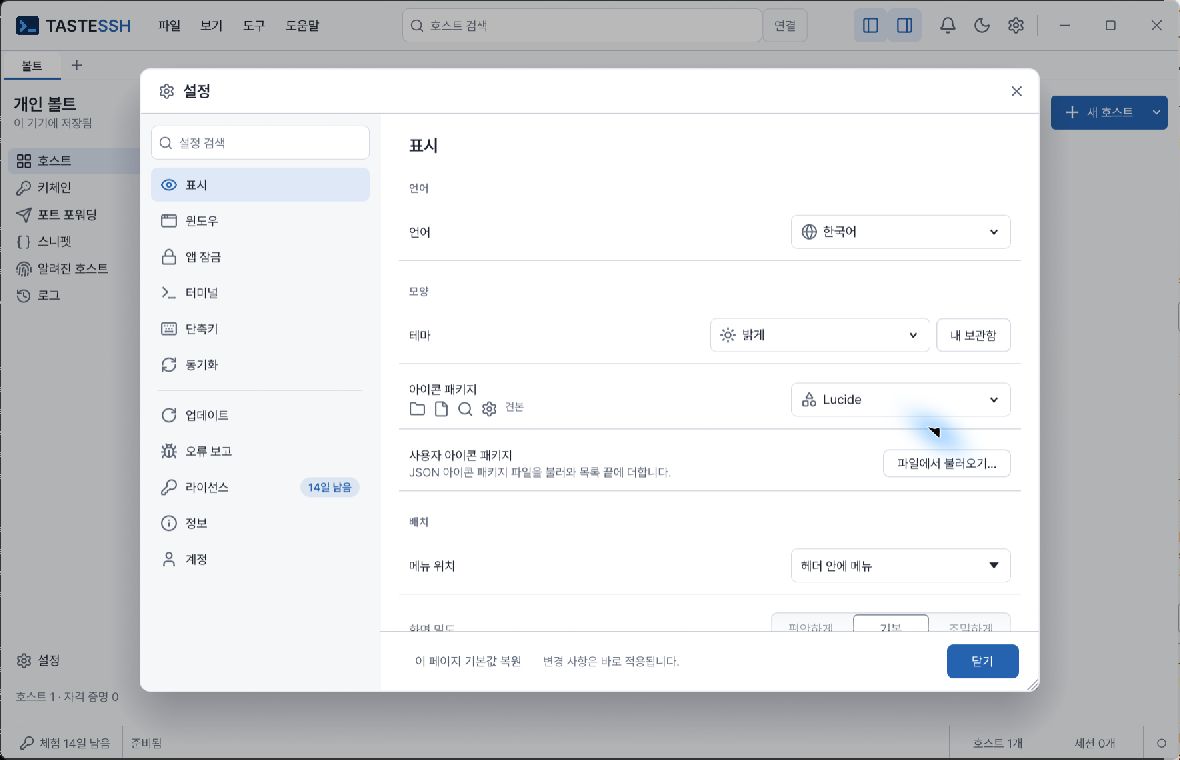
Display settings in the light theme
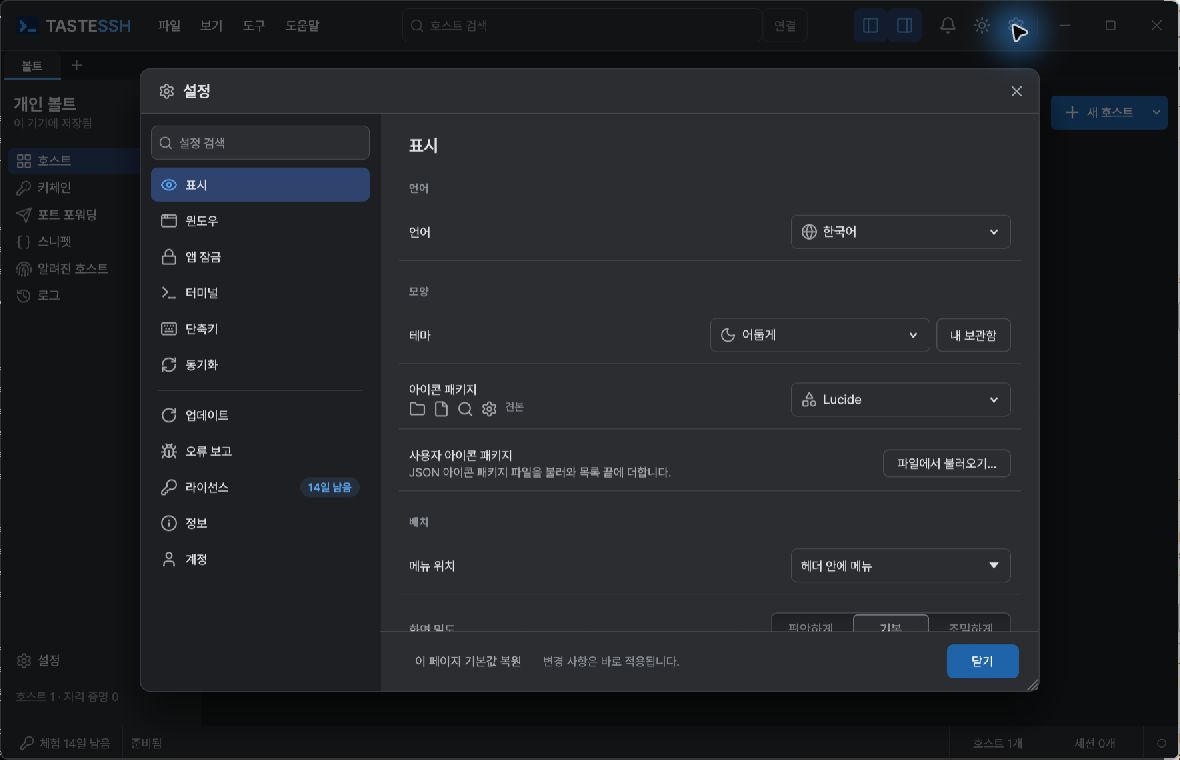
Display settings in the dark theme

Windows, themes and user data

Settings → Window → Show SFTP tab is off by default. In Settings → Display, adjust menu position (header/separate menu bar), language, theme, density, list display and icon package. If custom theme/library/account features appear there, inspect the connected account's installed list and application results. These features are separate from SSH-server login and keychain. This guide does not guarantee service verification of account login itself or online theme installation.

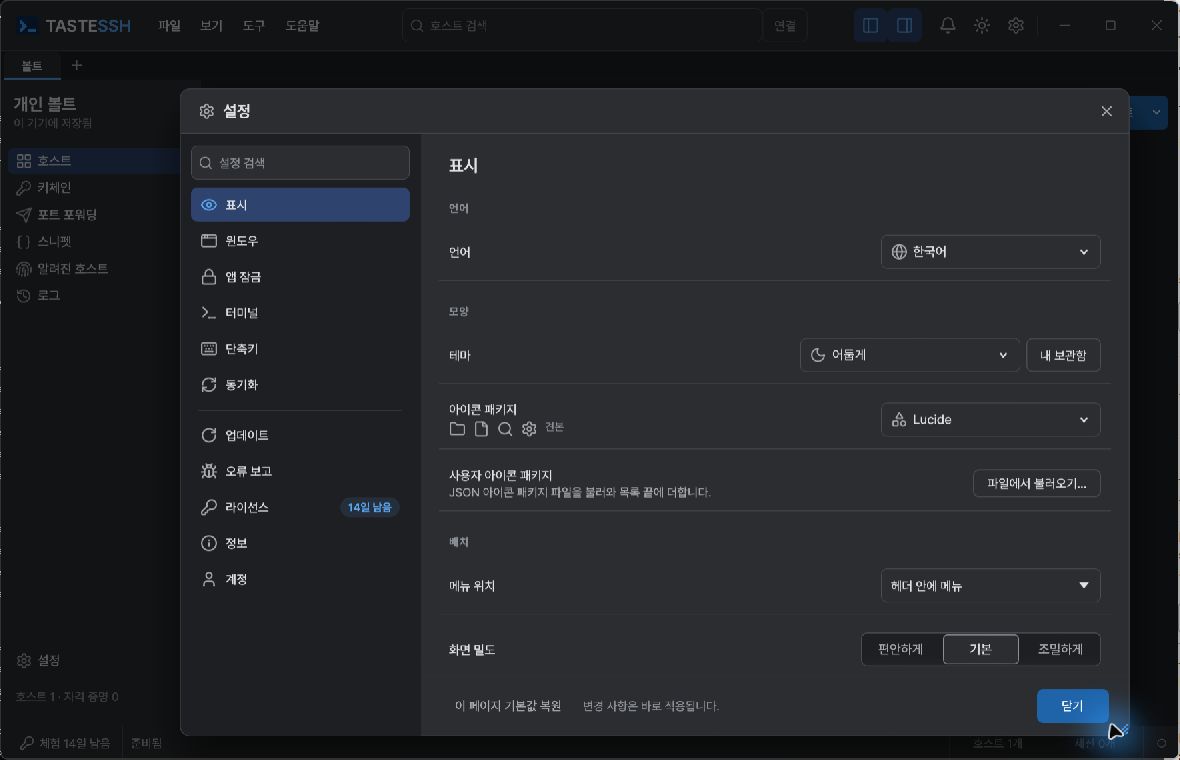
Settings windows can be moved/resized and open centered over the main window. Restore page defaults affects only that page, not all user data. App theme, terminal theme, density and scale are separate settings.
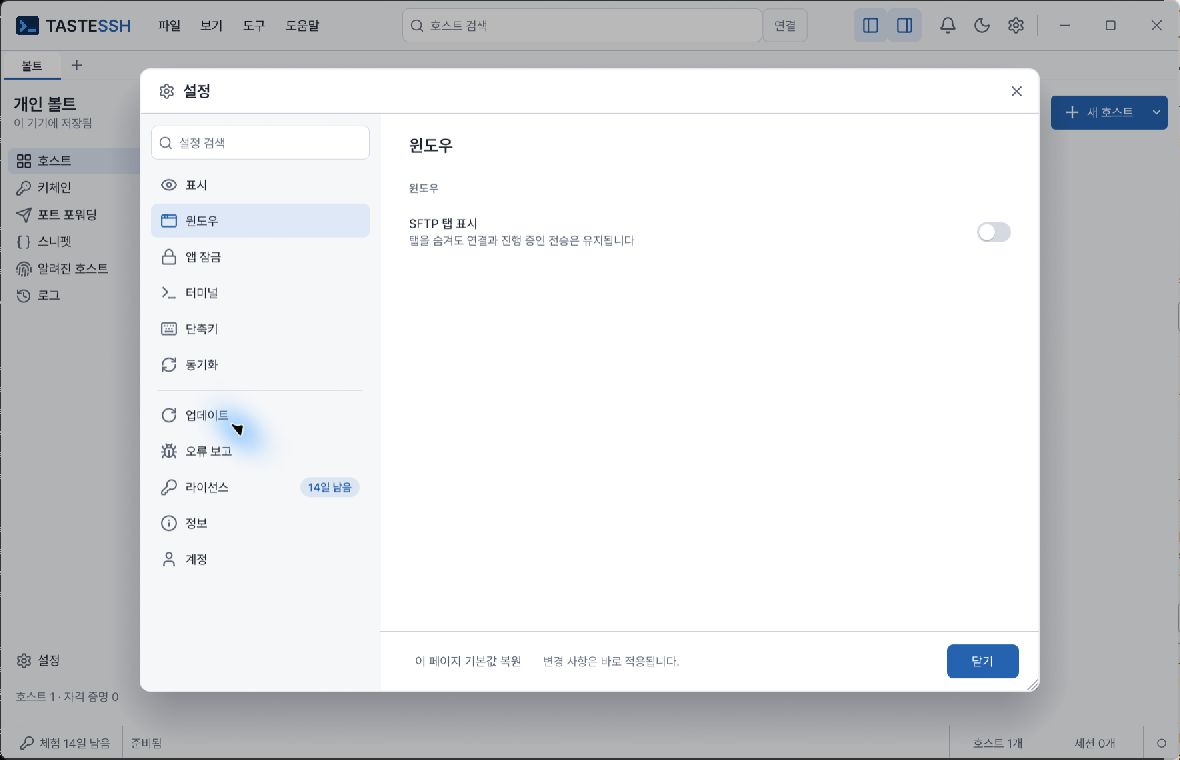
SFTP tab hidden by default in Window settings
Settings window after moving and enlarging

The expected result is the requested display change and save guidance. For settings import/export, check previews and product identity. Preserve original/backups before inspecting corrupted settings, permissions and recovery guidance; do not delete the entire settings folder first.

Settings and appearance

Online theme library

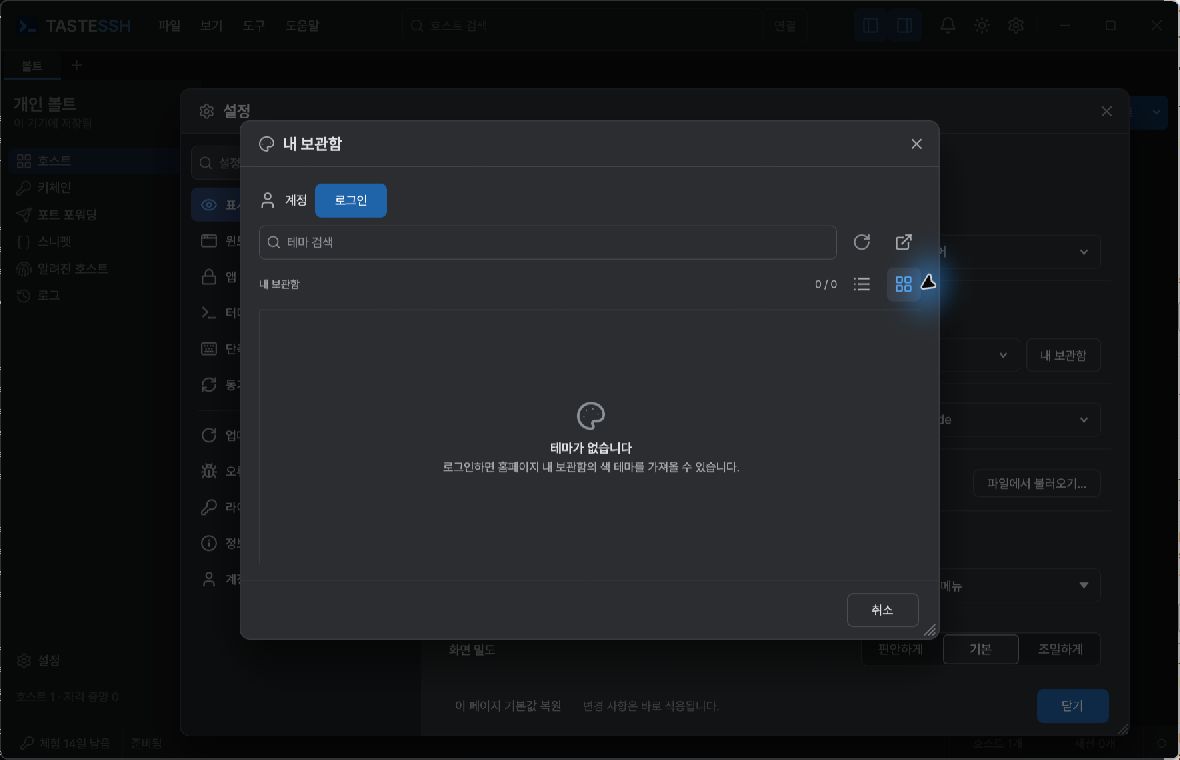
Open the theme library in Display settings to search and browse using List view / Grid view. List is the default; grid columns adjust to window width. View selection is temporary state in the running app: do not assume it survives relaunch.

  1. To use online themes, follow account sign-in guidance and complete browser authorization.
  2. When approval is received, the approval window closes and library lookup starts. Check whether list/error states have updated.
  3. Find items with search/view buttons and inspect whether they can be imported/applied.

If the list is empty or lookup fails, inspect login, connectivity and the displayed error, then refresh. Approval completion differs from successful theme download/application. This account is not SSH-host credentials, and changing views cannot resolve service outages or permission issues.
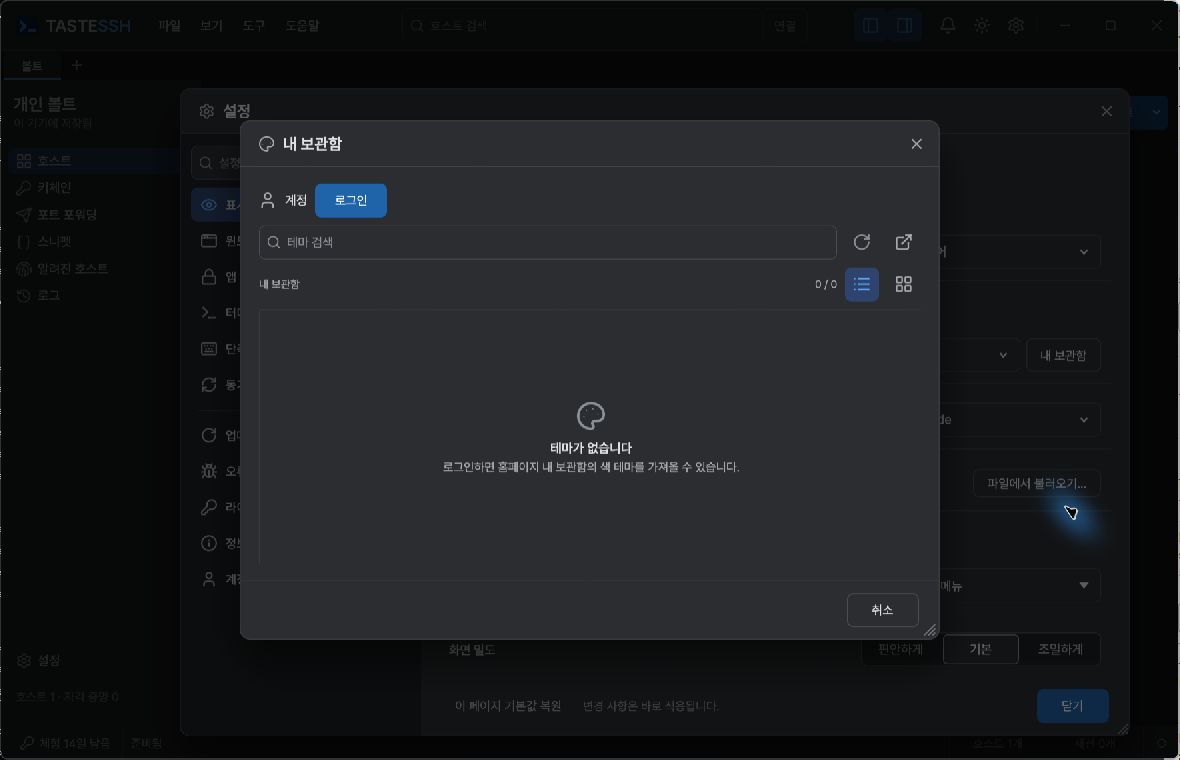
Signed-out library in list view with empty state
Grid view selected in the same empty library

These screenshots show view buttons and signed-out guidance, not actual account approval, online listings or applied themes.

Settings pages

Open with Ctrl+, or Tools → Settings. Tools → Check for updates opens a separate Software Update window rather than all Settings. Adjust automatic checks and other update settings on the general Settings window's Updates page.

Settings pageMain purpose
DisplayLanguage, theme and interface appearance
WindowWindow behavior such as showing SFTP on startup
App lockApp-lock settings
TerminalFont, cursor, terminal theme and session settings
ShortcutsReview keyboard commands
SynchronizationEncrypted metadata synchronization
UpdatesNew-version checks and update settings
Error reportingConsent, previews, sending and report-queue management
LicenceLicence state, registration and removal
AboutVersion/build, website, privacy policy and open-source notices
AccountOnline library account guidance/status, separate from SSH-server login

Adjust app and terminal themes separately. When increasing/decreasing scale, check that inputs and buttons remain visible. Ctrl+0 restores interface scale to 100%.

Settings apply/save on change, but some affect only new sessions or the next launch. Follow screen guidance. Even if a design update moves buttons, use feature names and the command palette to find them.

App lock and security

Configure app lock in Settings → App lock and review startup, idle and manual-lock policy. Securely retain the password needed to lock/unlock.

Locking can interrupt session work or affect connection state. Use server-side session-persistence mechanisms for important remote work; after unlocking, check current connections and jobs. App lock does not replace OS login security or disk encryption.

Basic security checks:

  • Verify server host keys through a separate trusted channel.
  • Connect to production servers with least-privilege accounts.
  • Minimize credential storage on shared devices.
  • Check transfer/synchronization destinations and permissions.
  • Account for the lack of communication protection in plaintext protocols.
  • Close unnecessary sessions and forwarding when finished.

Settings export/import

Use Export/Import in Settings to move supported options such as display and terminal preferences. Exported .tastedev-settings files are JSON settings documents.

  1. Export current settings and keep them safely.
  2. On import, verify product/version and review changes.
  3. Recheck display, update and error-reporting settings afterward.

This file is not a backup restoring all hosts, Vaults, private keys or passwords. It may contain synchronized settings, so inspect before sharing. Do not import settings from untrusted sources.

Error reporting and privacy

Consent in Settings → Error reporting is off by default. Consent and automatic reporting are separate settings. Enabling automatic reporting may send reports for failures or crashes through the report queue.

  1. Read the privacy policy and What is/is not sent on screen.
  2. Review actual report contents in Preview content to send.
  3. If necessary, consent and send a manual report.
  4. Check sending results and queue status. Clearing the queue does not delete reports already delivered to the receiving server.

Important: Crash-log messages, locations and call paths may be included verbatim and may contain file paths. Automatic anonymization or removal of every sensitive value is not guaranteed. Review previews/support materials and never send server accounts, passwords, tokens or private keys separately.

Use advanced collection-server address settings only for addresses designated by your organization's administrator. When asking for help, first provide installed version, OS, reproduction steps, expected outcome and actual error.

PreviousLogs and synchronizationNextUpdates and licences

On this page

  1. Windows, themes and user data
  2. Settings and appearance
  3. App lock and security
  4. Settings export/import
  5. Error reporting and privacy
Suggest an edit

Ads are not shown to subscribers or licence holders. Browse without ads