Hello from TASTEDEV,
We would like to introduce TASTEREMOTE, a remote desktop project that lets you view and control a remote computer through a web browser. Install the host app on the PC you want to access, then connect from a browser without installing a separate viewer app. You can use the TASTEDEV-operated server or run your own server.
TASTEREMOTE is under active development as we continue to improve its features and stability. Depending on your setup, you may encounter bugs or features that are not yet fully polished. Please review the supported operating systems and known limitations before getting started.
If you run into a problem or have feedback, please leave a comment or question on the product page. Including your operating system, TASTEREMOTE version, and the steps that led to the issue will help us investigate and improve the project.
Product and downloads: https://tastedev.net/products/remote
Documentation: https://tastedev.net/docs/remote
For setup instructions and development updates, follow the development log through the Learn more link below.
There is still work to do, and your feedback will help us improve TASTEREMOTE step by step. Thank you for your interest, for trying the project, and for sharing your experience with us.
The TASTEDEV Team
The site footer has Terms of use and Privacy policy links, and each agreement box on the sign-up page has View.
The built-in text exists in Korean and English. Pages in other languages show the English document with "This document exists in Korean and English only. The English text is shown." Above the built-in text, "Draft, not reviewed by a lawyer. Operators should check it before relying on it." shows.
The consent screens
At sign-up
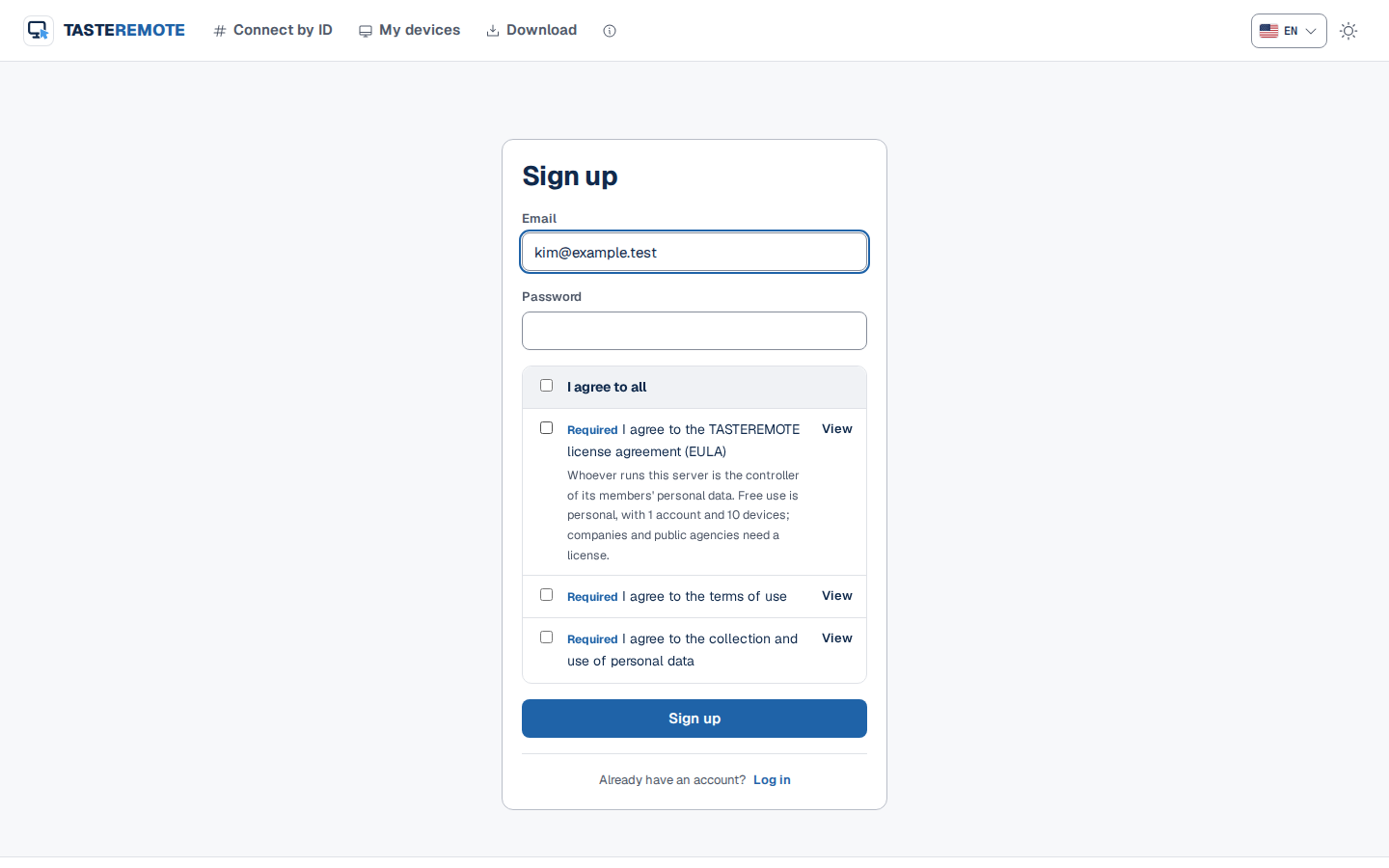
The sign-up page has I agree to all, I agree to the terms of use (Required) and I agree to the collection and use of personal data (Required). Both must be checked to sign up, and the server also refuses sign-ups without consent.
When creating the first administrator account, I agree to the TASTEREMOTE license agreement (EULA) (Required) must be checked too. For creating the first account, see First setup.
Sign up
Social logins and accounts the administrator creates
Signing up with a social login for the first time, the member goes through the consent page once after coming back. Accounts the administrator creates and invited accounts go through the same page at their first login.
The consent page has the title "Agree to the terms", the terms' version, the agreement boxes, Agree and continue and Log out. Nothing else opens until the member agrees.
Agreeing again when the version changes
When the terms' version changes, every account (the administrator included) must agree again. After the version changes, logging in or using a page opens "The terms have changed" first. To not agree, click Log out.
When the operator saves the terms of use or privacy policy, or goes back to the default text, the version goes up.
When the license agreement's version changes, the administrator agrees again.
Accounts from earlier versions without a consent record agree once at their next login.
Editing the terms of use and privacy policy
In Admin › Sign-up, under Terms of use and privacy policy, you edit the text of the documents members agree to. They are an agreement between whoever runs this server and its members, separate from the TASTEREMOTE license agreement (GXSOFT).
Choose the Terms of use or Privacy policy tab. A document not edited yet has the GXSOFT's default text badge, and the text box holds GXSOFT's draft as text.
Edit the text. Lines starting with ## become section titles.
Check the page in a new tab with Preview and click Save.
Saving raises the version, and every account agrees to the changed terms again at the next login. Before you save, the number of accounts that will agree again shows.
The version is the date of the day you save; from the second save on the same day, .2, .3 is added. The terms of use and privacy policy share one version.
The edited text shows as written, in the language you wrote it, on pages in every language, without the draft notice.
Back to GXSOFT's default text returns to the draft. This also raises the version.
While sign-up is off, this card is folded. You can edit it before you take members.
Operator details
In Admin › Branding, under Terms and privacy policy, enter the operator details to show on the terms pages and click Save.
Field
Content
Operator (organisation)
The name of the company or agency running this server
Contact
Where members can reach you
Privacy officer
The privacy officer's name
Privacy officer contact
Where to reach the privacy officer
Terms of use address (your own document)
The address of terms of use the operator keeps elsewhere (optional)
Privacy policy address (your own document)
The address of a privacy policy the operator keeps elsewhere (optional)
The top of the privacy policy page shows Controller, Privacy officer and Contact. Values left blank show as "Not filled in by the operator yet".
If you enter a document address (starting with https://), /terms and /privacy go to that address. It comes before the edited text. Leave it blank to use the server's documents.
Changing the operator details or the document addresses does not raise the version.
Legal review
The built-in text is a draft made by GXSOFT and has not been reviewed by a lawyer. Before you take members, fill in the operator details, adapt the terms of use and privacy policy to your organization, and have them reviewed by a lawyer.
Tip · GXSOFT's policies are at Policies. This server's member terms are set by the operator.
The license agreement record
The license agreement accepted when the first administrator account was created shows in Admin › License as a record of the version, date and account. A server installed with an earlier version shows "No record of the license agreement at the first install (a server set up with an earlier version).", and the record is made when the administrator agrees at the next login.
For the host app's license agreement, see Server license.